

Activating Your Benefit
How to Activate Your LegalEASE Benefit Plan
Activating your LegalEASE benefit is straightforward and can be done through one of two methods: Utilizing Single Sign-On (SSO) access (Employees Only) through your company's intranet or Registering through LegalCORNER (Employees & Family Members). Here's how:
Please Note: The SSO method is the easiest and fastest way for EMPLOYESS ONLY to access their LegalEASE benefits, eliminating the need for additional registration steps.
Option 1:
Use Single Sign-On Access via WM Total Rewards
(Employees Only)
Step 1:
Go to the homepage of WM Total Rewards and find and click on Programs.
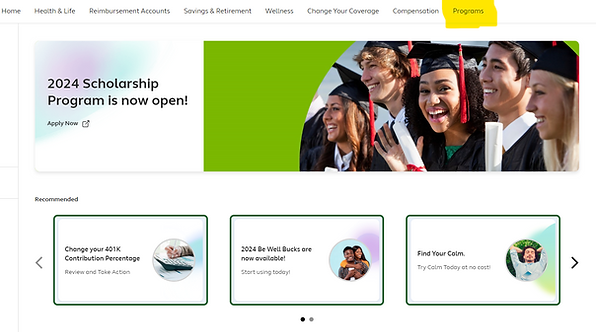
Step 2:
Once on the Programs page, scroll down until you find the LegalEASE tile and click on it to register using Single Sign-On.
Clicking on the LegalEASE link will automatically sign you in through SSO, granting you instant access to your benefits without the need for further registration.

Option 2:
Register through LegalCORNER
(Employees & Family Members)
01
Visit LegalCORNER
Navigate to the LegalCORNER website provided by your employer or you can click the button below.
02
Registration Process
Enter your required details such as employee ID, last name, and zip code. Follow the prompts to create your account.
03
Confirmation
You will receive an email to validate your account. Click the link to confirm and activate your benefits.